Audio Arts Production I
FX Processing
Reading and Discussion
FX Processing
- Every DAW and software application has slightly different ways of employing FX
- HOWEVER, they all function similarly:
- Channel assignments (inserts/sends)
- Busses and groups
- Master fader or main output
- Modeled after studios and mixing boards
Plugins
- Plugins can be downloaded and added for expanding features of any DAW
- Categories of plugins:
- Instrument: synths, samplers, emulators, etc.
- Audio/FX: filters, reverb, EQ, etc.
- Formats:
- VST2 and VST3: General for MacOS/Windows/Linux
- AAX: For Pro Tools Only
- Apple Audio Units (AU): MacOS - GarageBand and Logic Pro
- And more!
Common FX and their Params
- Many effects can be used to emulate physical spaces and behaviors, but also as creative modulations in and of themselves.
- Common FX parameters:
- Assumes Wet/Dry Mix, which is how much of the plugin's effect is mixed with the original audio signal, is often included in most plugins
- List of common FX and common parameters. Each plugin is unique, but you will likely find these params in each:
Reverb
- Portraying acoustic spaces
- Adding color to sound, like spring reverb
- Params
- Time: How long reverb lasts
- Pre-Delay: Time between original sound and start of reverb
- Size: How big is the space?
- Damping: How quickly high freqs
Chorus
- Stacking a signal and slightly detuning the stacks
- Gives a fullness/richness to the signal
- Params
- Rate: Speed of the pitch or delay modulation
- Depth: Amount of modulation applied to the signal
- Voices: Number of slightly detuned or decayed copies added to the original
- Delay Time: Base delay between the original and its copies
Filters
- Allowing isolation and removal of certain frequency bands
- Character of filter can add color to the signal
- Params
- Cutoff Frequency: Freq at which a filter begins reducing or shaping the signal
- Resonance (Q): Emphasizes freqs near the cutoff freq
Filters
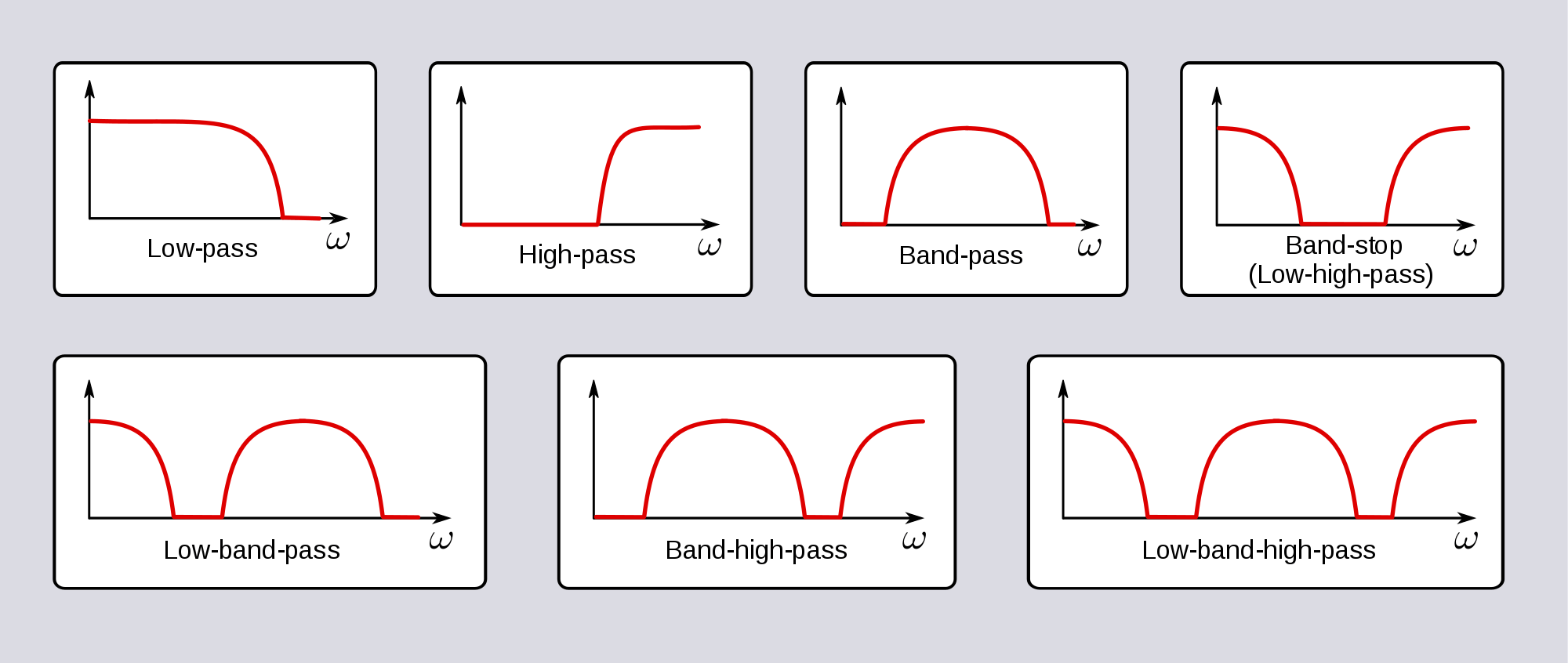
Delay
- Play back delayed copies of a signal
- Can also be thought of as echo in some cases
- Params
- Time: Interval between the original sound and each repeat
- Feedback: Amount of the delayed signal fed back into the effect to create additional repeats
- Sync: Synchronizes delay time to tempo or milliseconds
Phaser
- Shifts the phase of an audio signal on itself to create new characteristics
- Params
- Rate: Speed of the sweeping phase modulation
- Depth: Range or intensity of the modulation
- Stages: Number of phase-shifting sections that create moving peaks and notches in the frequency response
- Feedback: Amount of the output fed back into the effect to emphasize its resonant character
Flanger
- Delay + Phaser
- Params
- Rate: Speed of the modulated delay sweep
- Depth: Amount of variation of the delay time
- Feedback: Amount of output fed back into the effect, intensifying the resonant sound
- Manual/Base Delay: Sets the starting delay time and influences the effect's tonal character
Compressor
- Reduces dynamic range by lowering signals that exceed a set threshold
- Params
- Threshold: Level above which compression begins
- Ratio: Determines how much the signal above the threshold is reduced
- Attack: How quickly compression responds when the signal exceeds the threshold
- Release: How quickly compression stops after the signal falls below the threshold
- Gain: Raises the output level to compensate for volume lost
Compressor: Ratio
- Ratio determines how strongly a compressor reduces signals above the threshold
- Ratio examples
- 1:1: No compression
- 4:1: Every 4 dB above the threshold produces 1 dB of output above the threshold
- 10:1: Every 10 dB above the threshold produces 1 dB of output above the threshold
- Higher ratios produce stronger compression; very high ratios approach limiting
Compressor: Knee
- Knee
- Hard Knee: Compression begins abruptly at the threshold
- Soft Knee: Compression increases gradually around the threshold
- Compressor behavior can vary; some compressors adjust their response based on the incoming audio
Limiter
- Prevents audio peaks from exceeding a set level
- Params
- Threshold: Level at which limiting begins
- Ceiling: Maximum target output peak level
- Release: How quickly the limiter stops reducing gain after a peak
- Lookahead: Delays the signal internally so the limiter can respond before a peak reaches the output
- Input Gain: Raises the signal entering the limiter, increasing the amount of limiting
Expander
- Increases dynamic range by making quieter signals quieter relative to louder signals
- Params
- Threshold: Level below which expansion is applied
- Ratio: Amt of expansion applied to signals below the threshold
- Attack: How quickly the processor responds when the signal crosses the threshold
- Release: How quickly the processor returns to its unprocessed behavior
- Range: Max amount of gain reduction applied
Noise Gate
- Reduces signals below a set level to minimize unwanted noise
- Params
- Threshold: Level the signal must exceed to open the gate
- Attack: How quickly the gate opens when the signal exceeds the threshold
- Hold: Minimum time the gate stays open after the signal falls below the threshold
- Release: How quickly the gate closes after the signal falls below the threshold
- Range: Amount the signal is reduced when the gate is closed
Dynamic EQ
- Adjusts specific frequency ranges dynamically in response to the signal level
- Params
- Frequency: Selects the frequency range being adjusted
- Threshold: Level at which the dynamic EQ begins responding
- Range: Maximum amount of boost or cut applied
- Q: Determines how narrow or broad the affected frequency range is
- Attack/Release: Control how quickly the EQ responds and recovers
More coming soon!
- This will be an ongoing list as we work through projects.
- Some to be added...
- Distortion
- Tremolo
- Vibrato
- What else?!
Group Project 2 Rubric
| Parameter/Criteria | More information | Maximum Points |
|---|---|---|
| Your group recorded an entire song, original or cover, in Pro Tools and successfully presented it to the class. | As explained in the syllabus, groups must share their work, ideas, techniques, challenges, and approaches of their project. We will listen in class in an environment for constructive criticism and feedback. If you are absent during your project's presentation, you will individually not receive credit for this portion. | 10 |
| Recorded and included ALL instruments that your group has available. | You must also use at least one sample or software instrument in your track. It cannot replace an instrument you have in your group, but instead augment available instruments. For example, if someone plays the drums, you must record and include the drums! But you can also add a drum machine part. | 5 |
| Techically well executed. | All parts are organized/labeled on their respective tracks and session is easy to read/follow. No audio is clipping. Use of space, panning, reverb, depth, and volume control is required. If any of these is not adhered to (ie. no panning, no volume changes, clipping/peaking, etc.) you will lose points for this section! | 20 |
| Successful deliverable of Pro Tools session file, complete with audio files and dependencies | The submission must be clearly labeled in your drive, not have multiple nested versions, all audio included, and open as you intend it to be heard in class. Make sure nothing is muted or hanging audio is in your session. Think of this as if you are sending your final product to a label for pressing! | 10 |
| Successful deliverable of audio file: 48k/16-bit WAV file. (Not MP3, not AIFF, not FLAC, not anything else!) | Export your full song correctly and deliver via USB stick. | 5 |